Get ALL the Math and Science with ONE Computer Software Program!New and faster interactive features motivate students to see and interact with math and science more deeply:
-
Animated Path Plot: Visualize function, parametric and polar graphs as they are drawn in real time.
-
Dynamic Coefficient Values: Explore direct connections between dynamic coefficients in equations and graphs.
-
Points by Coordinates Create dynamic points defined by coordinates, sliders or expressions quickly.
-
Tick-Mark Labels: Label axes scales to create visual contexts that promote understanding.
-
Python Programming: Create and run Python programs.
-
TI-Basic Programming Enhancements: Write code for visual illustration of key math, science and STEM ideas.
-
deSolve wizard: Reduce syntax errors in solving differential equations.
-
Disable CAS: Disable algebraic functionality easily in the Press-to-Test dialog box or in document settings.
Calculate, graph, write notes, build spreadsheets and collect data, all with the TI-Nspire™ CX Student Software.
-
Calculator: Perform calculations in proper math notation.
-
Graphs: Plot, explore and animate functions, equations and inequalities.
-
Geometry: Construct and explore dynamically geometric figures and properties.
-
DataQuest: Plug and play data collection and scientific analysis.
-
Lists & Spreadsheets: Combine spreadsheet functionality with mathematical operations.
-
Data & Statistics: Dynamic graphing and interactive analysis of data.
-
Notes: Create interactive activities, documents or reports.
-
Programming: Add new functionality and create rich STEM activities with Python and TI-Basic coding languages.
Other Features include:
Explore Higher-Level Math Concepts
Explore symbolic algebra and symbolic calculus, in addition to standard numeric calculations. View exact values — in the form of variables such as x and y, radicals and pi — when doing step-by-step arithmetic, algebraic and calculus calculations.
Make Mathematical Connections
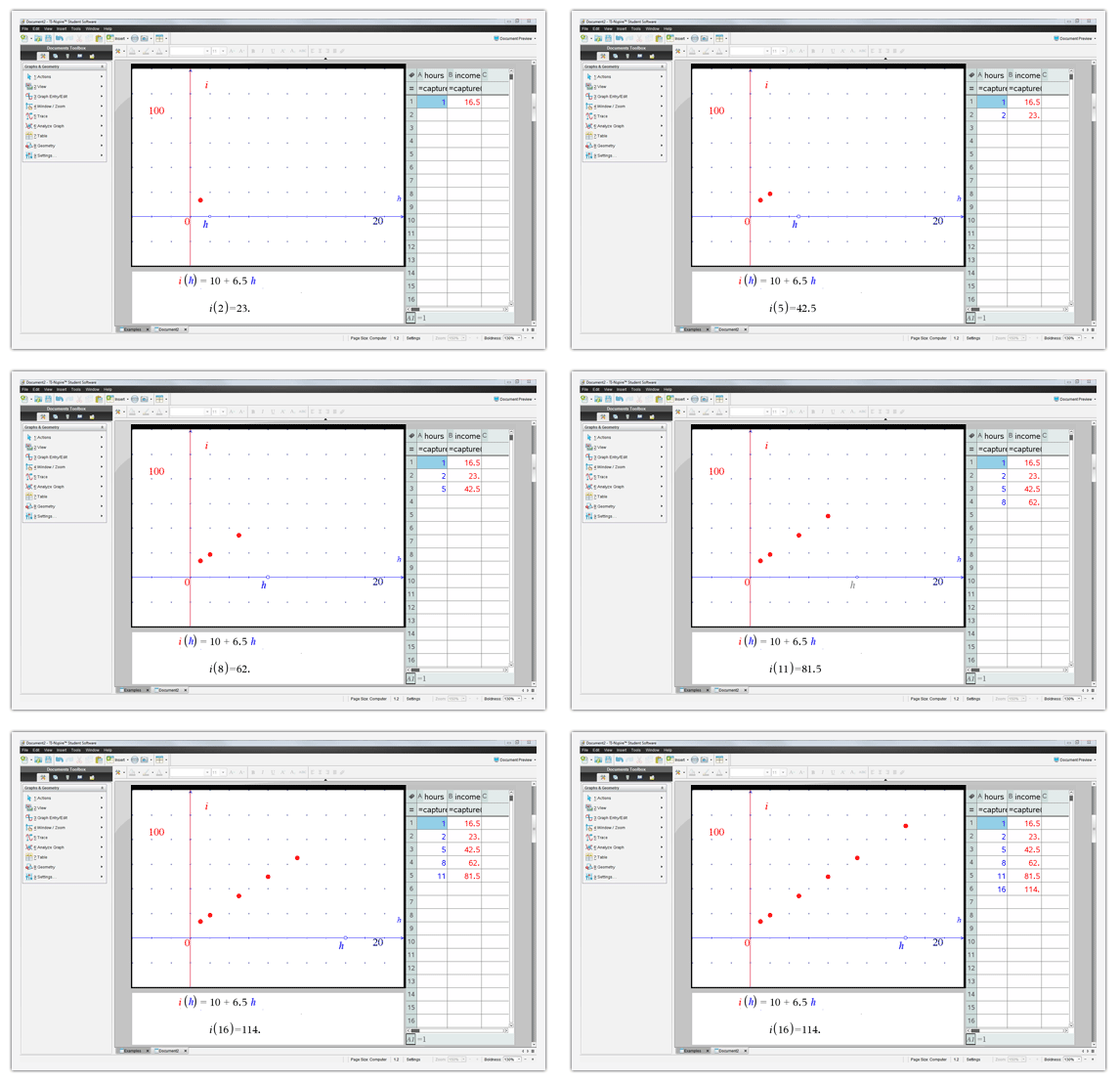
View multiple representations at the same time and recognize updates to representations as things change mathematically; promote conceptual understanding regardless of students’ individual learning styles.
Create Dynamic Documents
Use the PublishView™ feature to add
TI-Nspire™ applications, rich text, hyperlinks, images or videos and create interactive worksheets, lab reports and homework assignments.
Bring Concepts Into View
In addition to the normal computer view, you can also work on documents in the special handheld view, which shows documents as they appear on the TI-Nspire™ CX graphing calculator display.
Share Files with Ease
Students can easily transfer work between their TI-Nspire™ CX graphing calculator and computer to complete work outside of school, at home or at the library.
Built-In Functionality:
- Computer Algebra System (CAS) capabilities
- Function, parametric, polar, conic, sequence and 3D graphing
- MathDraw uses touchscreen or mouse gestures to create points, lines, triangles, and other shapes
- Multiple graphing functions can be defined, saved, graphed and analyzed at one time
- MathDraw uses touchscreen or mouse gestures to create points, lines, triangles and other shapes
- User-defined list names in Lists & Spreadsheet application
- Eleven interactive zoom features
- Numeric evaluations in table format for all graphing modes
- Interactive analysis of function values, roots, maximums, minimums, integrals and derivatives
- Six different graph styles and 15 colors to select from for differentiating the look of each graph drawn
- Matrix operations: transpose and augment matrices; use elementary row operations; find inverse, determinant and reduced row echelon forms; convert matrices to lists and vice versa; calculate eigenvalues and eigenvectors
- List-based, one- and two-variable statistical analysis, including logistic, sinusoidal, median-median, linear, logarithmic, exponential, power, quadratic polynomial, cubic polynomial and quartic polynomial regression models
- Three statistical plot definitions for scatter plots, xy-line plots, histograms, regular and modified box-and-whisker plots and normal probability plots
- Advanced statistics analysis, including 10 hypothesis testing functions, seven confidence interval functions and one-way analysis of variance
- Eighteen probability distributions functions, including the cumulative distribution function (CDF), probability density function (PDF) and inverse probability distribution function for normal, chi-squared, t-, and F- distributions; and the CDF and PDF for binomial, geometric and Poisson distributions
- Built-in interactive geometry capabilities
- TI-Nspire™ documents (.tns files) — compatible with TI-Nspire™ Software, TI-Nspire™ graphing calculators and TI-Nspire™ Apps for iPad® — can be created, edited, saved and reviewed
- Use images (.jpeg, .jpg, .bmp, .png formats) that can be overlaid with graphical elements
- Explore mathematical expressions in symbolic form, see patterns and understand the math behind the formulas
- Chem Box feature allows easy input chemical formulas and equations
- Visualize multiple representations of a single problem in algebraic, graphical, geometric, numeric and written forms
- Manipulate linked representations of properties to instantly update the others and show meaningful connections without switching screens (for example, grab a graphed function and move it to see the effect on corresponding equations and data lists)
Programming:
- With Python, as well as TI-Basic, you have different options for coding languages
- Features a dedicated programming environment as well as programming libraries for global access to user-defined functions and programs
Graphing Calculator Support
Compatible with:
- TI-Nspire™ CX
- TI-Nspire™ CX CAS
- TI-Nspire™ CX II
- TI-Nspire™ CX II CAS
/eh/2025-01-08/173633966714069467/picture.png)

/eh/2024-12-24/173503345348979036/Favorite-Icon.png)
/eh/2025-07-08/1751962110204480194/picture.png)
/eh/2025-06-21/1750485478958537574/countryInfoIcon.png)
/eh/2025-06-21/1750485741321434291/Hi-Sign-in-My-Nihao.png)
/eh/2025-06-21/1750485837193896318/cart.png)
/eh/2025-06-21/1750485968202533847/cart.png)
/eh/2025-04-17/1744862476612819675/hot-img.png)
/eh/2025-11-07/1762504524550532584/header-icon.jpg)
/eh/2025-07-07/1751875582852206790/header-icon.png)
/eh/2025-07-07/1751875587886277738/header-icon.png)


